What the published example actually does
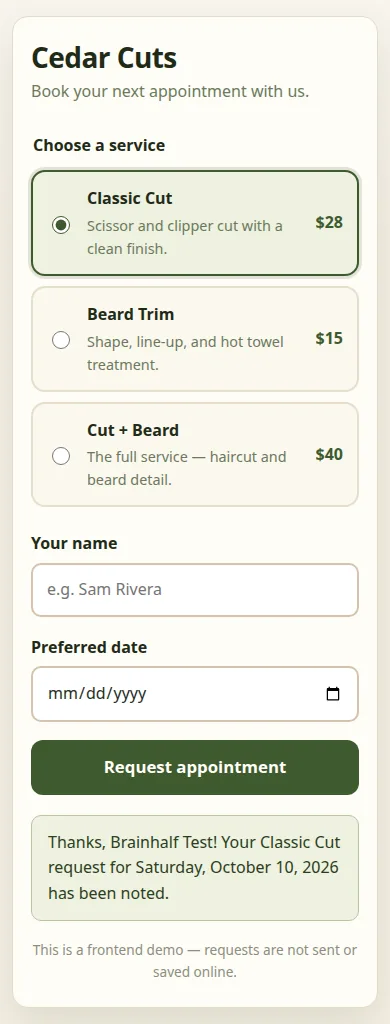
The app shows three services with prices, lets a visitor enter a name and preferred date, and displays a confirmation after validation. Its visible notice explains that requests are not sent or saved online. Cedar Cuts is a fictional example, and the service prices are demonstration data.
The screenshot below comes from the published app after a synthetic test submission. You can try the public demo with made-up information; a confirmation does not book a real appointment.
Reference documentation
The initial prompt kept the scope small
We specified the business, fields, action and expected result. We also said that the first version should use local form state without a backend. This makes a frontend prototype easy to distinguish from a booking service that stores personal information.
Create a small responsive appointment request frontend for a local barber called Cedar Cuts. Show three services and prices, a date input, a name input, and a Request appointment button. Validate both inputs and show a clear confirmation on submit. This is a frontend demo: say requests are not sent or saved online. Use React state, no backend, no external images or dependencies. Write the working app files now.Open the app builder
The first version needed a design revision
The initial generation wrote the app and form components, but their styling was incomplete. We asked BrainHalf to finish the existing design with warm ivory, forest green, readable service cards, visible keyboard focus and a single-column mobile layout. We asked it to preserve the working form and frontend-only scope.
This follow-up mattered. The first successful generation event did not establish that the page looked finished. Open Preview, use the form and name the specific issue you want changed. If you are on a phone, switch from Chat to Preview before judging the layout.
The checks we ran before and after publishing
We tested the saved app in the workspace, then repeated the main interactions on its public URL. The checks passed for this version; they do not cover every device or every possible input.
- Submitting an empty form shows messages for both the missing name and missing date.
- Entering a test name and future date displays a confirmation containing that name.
- The page fits a 390-pixel-wide viewport without horizontal overflow.
- Reloading the workspace preserves the app source; reloading the public URL renders the app again.
- The visible demo notice continues to explain that submissions are not saved or sent.
How long this build took
In this single September 24 test, the initial response appeared about 3.6 seconds after the browser sent the request. Generation finished in about 102 seconds. The separate styling request took about 89 seconds, and successful publication took about 80 seconds from the Publish click.
The run used BrainHalf’s default model and fast mode. These are individual observations, not typical latency, a load test or a promise for your project. Publication initially hit the account’s hosted-project limit; an unused reservation from an earlier failed installation was recovered before the successful attempt. Review and troubleshooting time are additional to the figures above.
What would make this a real booking app?
A real booking workflow needs saved requests, a schedule, a rule for conflicting appointments and an owner who can review them. Decide whether a submission is only a request or an immediately confirmed reservation. Do not show “booked” until the server has accepted it.
Ask for a managed backend and database, then verify persistence and permissions. For email confirmations, verify the owner and configure sending before testing delivery to a controlled recipient. A working email configuration does not prove that a message reached an inbox.
Add these features incrementally. Test two people requesting the same time, cancellation, unavailable dates and failed network requests. The published Cedar Cuts demo has not implemented or passed those real-booking checks.
Reference documentation